This post is part of an ongoing series where Claude is a real collaborator on the build, not autocomplete.
My parents have two Marstek Venus E3 home batteries, a Shelly Pro EM-50 measuring what the grid and their solar panels do, and Home Assistant tying them together. I set it all up for them, with the help of Claude. The goal was for both batteries to behave as one pool and steer grid import and export toward zero.
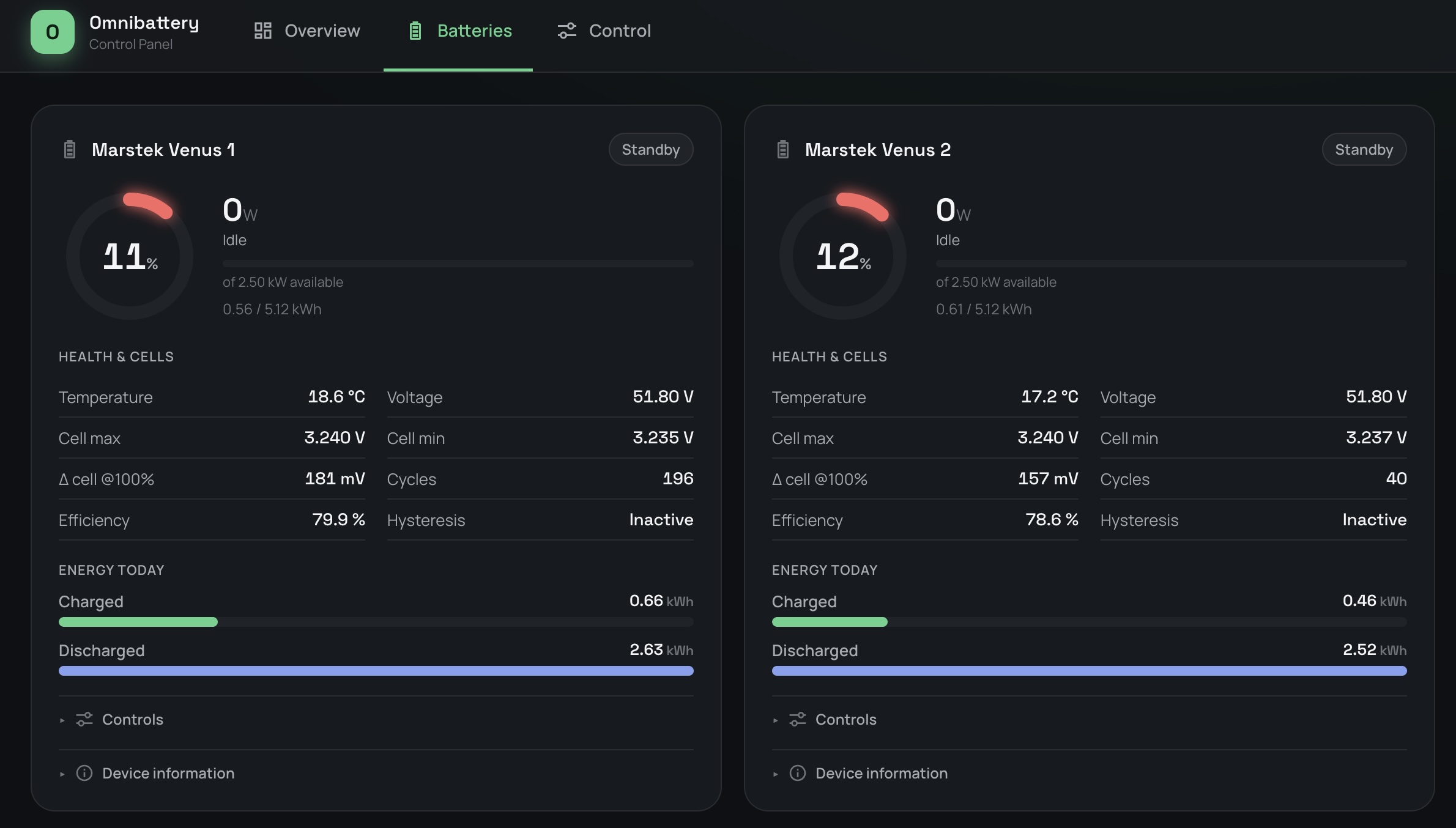
It works. One battery now usually discharges while the other idles, and the grid reading sits close to zero. This post follows the setup roughly in the order I built it, including the one battery that refused to connect.
The hardware: two Marstek Venus E3 batteries and a Shelly meter
- Two Marstek Venus E3 batteries. Each is 5.12 kWh and offers 2.5 kW of power. Neither uses an RS485 adapter. The first went in during July, the second arrived at the end of September.
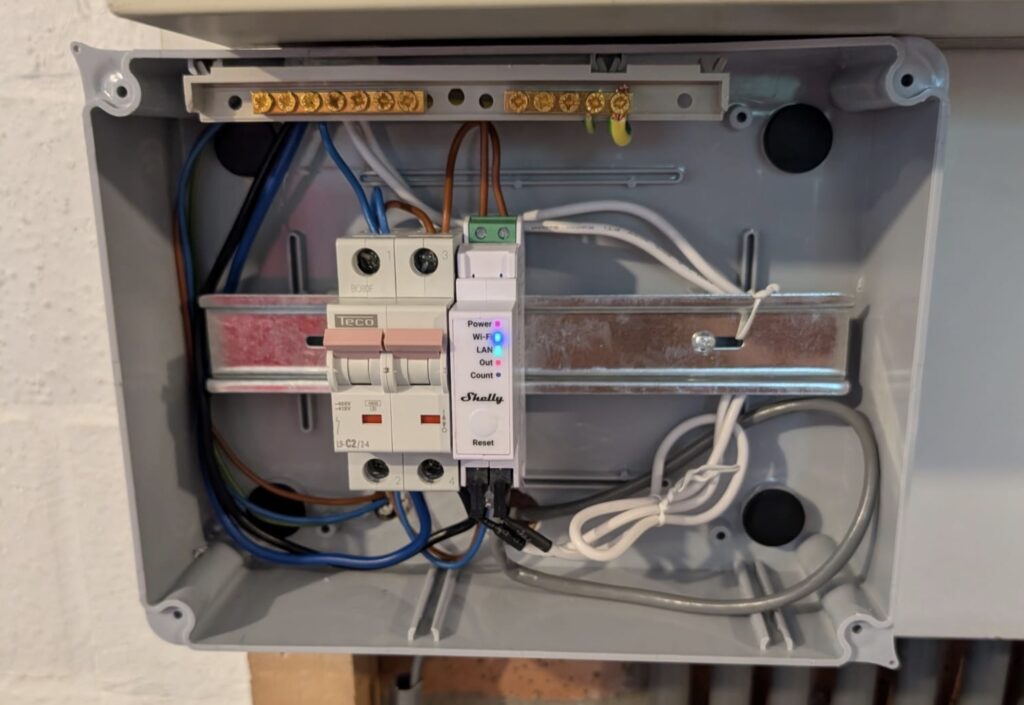
- A Shelly Pro EM-50. It is a single-phase meter with two independent clamp channels.
em1:0measures the power at the grid connection andem1:1measures the power from the solar inverter. - Home Assistant, with the Mosquitto broker add-on. Mosquitto handles MQTT, a lightweight messaging protocol that devices use to send readings to each other.
- The grid connection: 40 A, 230 V, single phase, at my parents’ house.
- A 1 Gb Ethernet switch, a TP-Link TL-SG105, with an uplink to the router. The NAS, the EM-50 and both batteries are plugged into it, all with static IPs.
Why everything is wired
Every component is on Ethernet. That was deliberate. Many plug-in battery setups I know of in Belgium use WiFi together with a P1 meter, and that link has a reputation for dropping. At a family gathering several relatives were watching their own battery setups, and more than one had found the meter disconnected from the battery. My parents had the same problem. Since everything here was wired, the system has run rock solid.
One note on firmware: update the Marstek batteries with the unit fully disconnected, meaning WiFi and Bluetooth both off. Updates failed or stalled when the battery was still connected over either.
Metering with the Shelly Pro EM-50
A battery that aims for zero import and export has to know, second by second, how much power flows to or from the grid. The batteries cannot measure that themselves, so a meter at the grid connection tells them. Everything else in this post depends on that reading being correct.
The Shelly Pro EM-50 does this with two clamps. Each clamp goes around one cable and measures the current in it: one on the cable from the grid, the other on the cable from the solar inverter. The meter combines current and voltage into power in watts.
Checking the clamps
I checked both clamps with real changes instead of assuming. Switching off the solar fuse showed the solar clamp reading the inverter’s current. Unplugging the battery showed the grid clamp reacting exactly as expected, which also confirmed the sign convention: negative power is returned to the grid, positive is taken from it.
Connecting the meter to the Marstek app
The Marstek app can read an EM-50 as its smart meter. When I first selected the EM-50 in the app, the meter showed as “offline / diagnosing”. The fix was to set RPC over UDP on the Shelly to port 2223, with the IP field left blank. The app connected instantly after that. The app only ever reads em1:0, whichever clamp is wired there, so the grid clamp has to be channel 0.
I didn’t find this in Marstek’s documentation. Credit goes to the owners who worked it out: a thread on the Shelly community forum (port 2223, no IP address, and the app only reads one channel). A Wireshark capture on GitHub shows the app broadcasting an EM1.GetStatus request to port 2223.
One controller for two Marstek Venus E3 batteries
Something has to decide when a battery charges and when it discharges. That is a controller: an algorithm that looks at the power measurement and adjusts the battery to keep the grid reading near zero. By default, this controller lives inside the Marstek battery and uses the external meter, here the Shelly, as its input.
That works for one battery. With two, it gets worse. In my experience, Marstek’s own support for running a second battery alongside the first is limited. Each battery runs its own controller, and the two can work against each other, with one charging while the other discharges. I saw exactly that here.
A single controller outside the batteries should do better. It sees the same grid reading, decides once, and tells each battery what to do.
In July, Claude and I compared the Home Assistant options for such a controller. ViperRNMC’s marstek_venus_modbus gives plain access to a battery over Modbus TCP, a standard protocol for reading and controlling devices over the network. When the second battery arrived I wanted one controller for both, and landed on Omnibattery by ffunes, the successor to Marstek Venus Energy Manager.
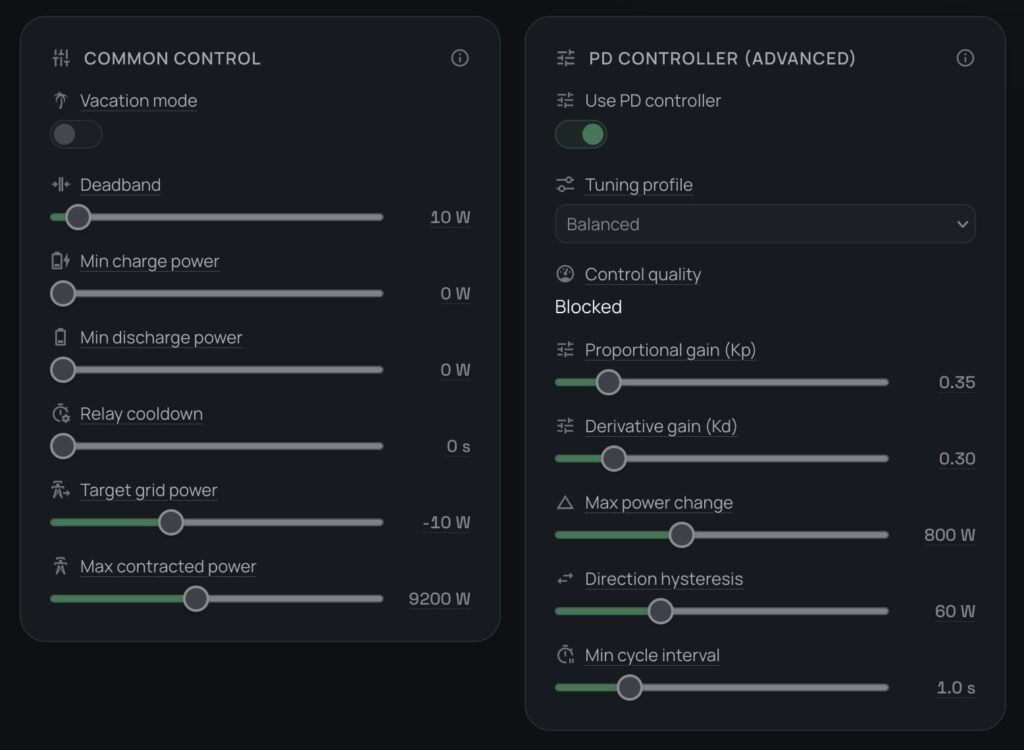
Omnibattery runs a PD (proportional-derivative) controller that treats the batteries as a pool and aims for zero grid exchange. Each battery gets its own Modbus connection (IP address, port 502 and model Venus E v3) and its own limits for charge power, discharge power and state of charge. Both batteries have a 12% minimum charge level. Each battery also needs its RS485 control mode switched on, the setting that lets an external controller command it.
Making the grid readings fast enough
A controller like this works best on a steady rhythm. From control systems I know that PID-style controllers (Omnibattery’s is a PD controller) expect a fixed time between iterations. The derivative term reacts to how fast the grid reading changes, so it divides by the time between readings. If readings arrive at irregular moments, the controller gets that time wrong and reacts too strongly or too weakly. It wants a fresh reading every second or two, on a reliable schedule. Home Assistant raised a Repairs warning that the grid power sensor was updating too slowly.
The Shelly’s own MQTT notifications are event-driven: they publish only when a value changes. That gave sparse, irregular readings, the opposite of what the controller needs. What worked was a short script on the Shelly that polls EM1.GetStatus on a timer and publishes every 2 seconds, whether or not the value changed. Claude wrote it:
let CONFIG = {
  period_ms: 2000,
  grid_id: 0,   // em1:0, grid
  solar_id: 1,  // em1:1, solar
  topic_prefix: "<shelly-id>/fast"
};

function publishChannel(id, suffix) {
  Shelly.call("EM1.GetStatus", { id: id }, function (result, error_code) {
    if (error_code === 0 && result) {
      let payload = JSON.stringify({ act_power: result.act_power });
      MQTT.publish(CONFIG.topic_prefix + "/" + suffix, payload);
    }
  });
}

Timer.set(CONFIG.period_ms, true, function () {
  if (!MQTT.isConnected()) return;
  publishChannel(CONFIG.grid_id, "grid");
  publishChannel(CONFIG.solar_id, "solar");
});
The Shelly script: it publishes the grid and solar power to MQTT every 2 seconds.
On the Home Assistant side, two MQTT sensors read these topics with the value template {{ value_json.act_power }} (device class power, unit W). Omnibattery’s grid sensor now points at the fast one, and the Repairs warning is gone.
Two things cost me time here. The Mosquitto add-on needs a dedicated login for the Shelly. The auto-created homeassistant user is for Home Assistant itself. And twice the Shelly’s MQTT password field turned up empty, which showed as connected: false until I re-entered it.
I used a similar approach to develop an ESP32 feeding Home Assistant, in the standing desk post

From a constant 50 W export to a grid reading near zero
Before Omnibattery, the first battery ran on its own, reading the Shelly through the Marstek app. In that setup the battery kept pushing about 50 W into the grid, all the time. With the battery unplugged, the grid reading flipped from about -58 W (export) to +181 W (import), so the export was real. The goal was zero import and zero export, and you cannot get there with a permanent 50 W export.
I do not know the cause, and I do not think the Shelly was at fault. Either switching the Marstek to the Shelly as its meter source changed how the battery regulates, or this was simply the first time I could measure the battery’s behaviour accurately and it had always done this. I found no setting for it in the app and no Modbus register for it. The firmware release notes mention an “anti-backflow” baseline, which may play a part, but I could not confirm that.
With Omnibattery in control and the fast readings in place, the 50 W export was gone. A small steady import remained. The deadband, the zone around the target where the controller does nothing, was 40 W. That is wider than the error, so the controller never corrected it. I tightened the deadband to 10 W and set the target grid power to -10 W, so the controller leans toward a tiny export. I did not touch the PD parameters: the tuning profile is still “Balanced”, with a proportional gain of 0.35 and a derivative gain of 0.30.
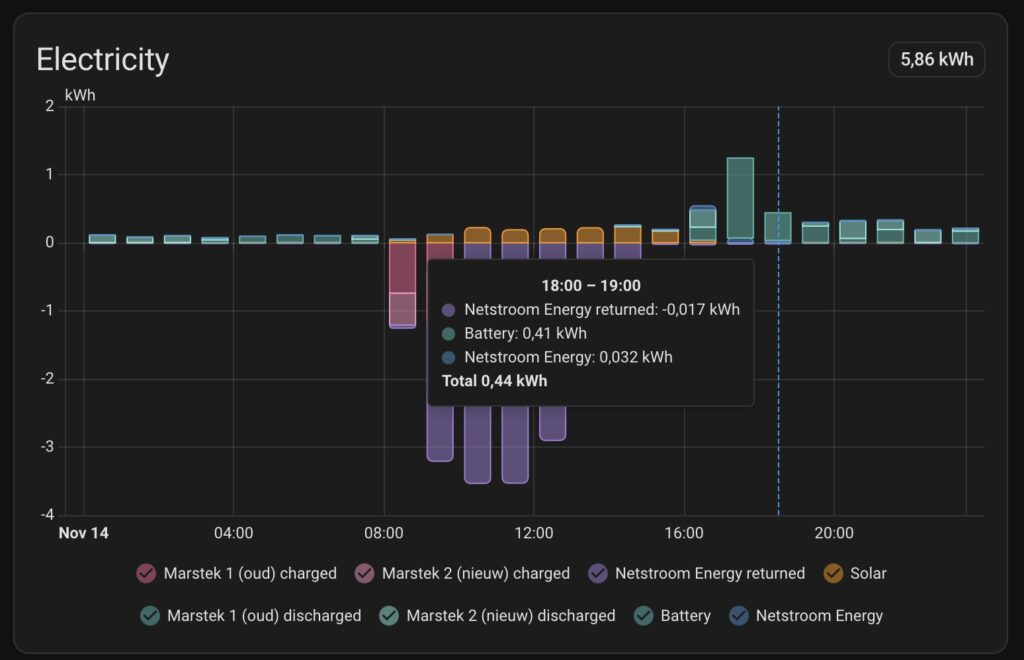
The grid reading is now much more balanced around zero. In the evening, when the batteries cover the house load, the energy returned to the grid is about 0.01 to 0.02 kWh per hour.
Battery 1 and the refused port 502
I call the two batteries battery 1 and battery 2. Battery 1 is the older one, installed in July and running on firmware 148. Battery 2 is the new one that arrived at the end of September.
Until the port was fixed, battery 1 kept running on its own in the Marstek app, reading the Shelly, while Omnibattery controlled battery 2.
The new battery, battery 2, connected to Omnibattery on the first try. The existing one, battery 1, did not. Omnibattery showed the error “cannot connect” for it. To see whether the problem was in Omnibattery or in the battery, I tested the connection directly with nc (netcat), a small command-line tool that tries to open a network connection to a given port. Modbus uses port 502, and for battery 1 the answer was “connection refused”. That means the battery itself was turning the connection away. Omnibattery was not at fault.
What I checked:
- Firmware. Battery 1 was on firmware 148, well past the V144 that Modbus TCP needs.
- The port test. The same command against both batteries:
nc -zv <ip> 502. Battery 2 answered with “succeeded”, battery 1 with “connection refused”. - Another round of firmware and a factory reset. No change.
Other owners had posted the same symptom in forums and GitHub issues, most of them unanswered. The one documented limit that matters: the Venus E3 allows only one concurrent Modbus TCP connection (Omnibattery issue #477). In its first answer, Claude had listed a leftover integration holding that connection as a possibility. We moved on to firmware, the cable and the factory reset.
What finally showed it was an accident. One evening I was doing a full system update, which took Home Assistant down. While that was going on, my father ran a port scan on the network. Battery 1’s port 502 was suddenly open. Later, with Home Assistant running again, I tested from the Home Assistant terminal and it was refused again.
That’s when it became clear. Whenever Home Assistant was up, something in it was holding the battery’s only Modbus slot. It was the Marstek Venus Modbus integration I installed in July, still configured against battery 1. A refused port 502 looked exactly like a disabled Modbus service, but the Modbus service was running. It was refusing a second client.
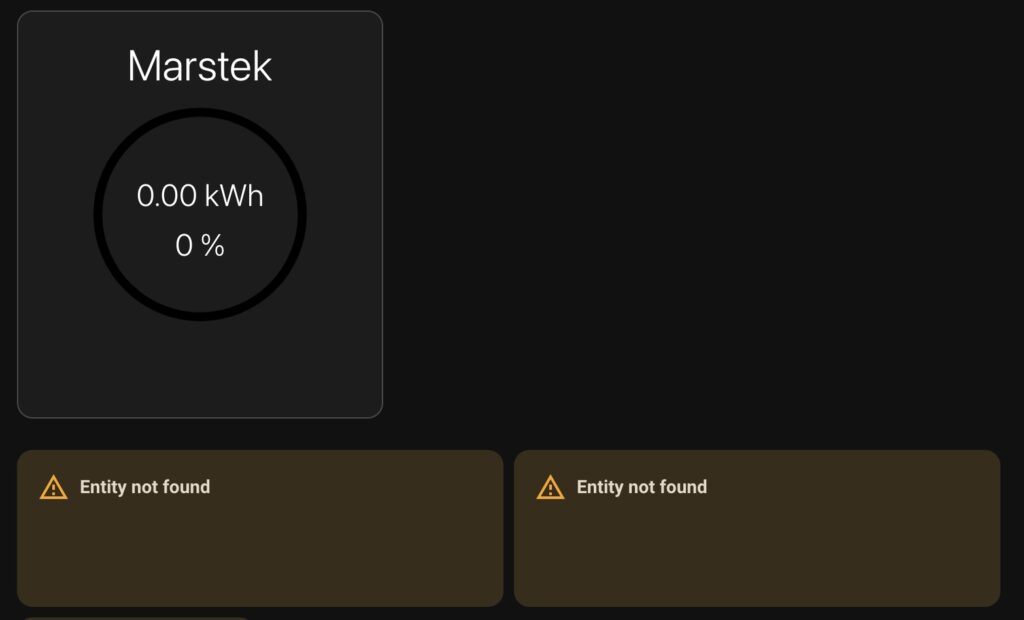
I disabled the Marstek integration in Home Assistant, which released the connection. Port 502 on battery 1 then stayed reachable and Omnibattery connected to it. The old battery entries in the Energy dashboard now showed “Entity not defined”, because the sensors they pointed to were gone.
If port 502 is refused on your battery:
- ⬜ Firmware V144 or newer
- ⬜ The battery connected by Ethernet, with a static IP
- ⬜ Nothing else connected to it: an old Marstek Venus Modbus integration, other Home Assistant add-ons, Node-RED, scripts on other machines
- ⬜ If you are testing with
nc, Omnibattery disabled first, since it holds the connection too - ⬜ A scan or
nctest with Home Assistant stopped, or its Modbus integrations disabled. If the port is open then, Home Assistant is your culprit - ⬜ Battery power-cycled to drop stale connections
The Energy dashboard
Each battery gets its own entry under Home battery storage. Use Omnibattery’s per-battery total_charging_energy for “going into the battery” and total_discharging_energy for “coming out of the battery”. These are lifetime totals. The daily sensors reset at midnight and the dashboard rejects them. If a sensor does not show up in the picker, check in Developer Tools > States that it has the energy device class and the total_increasing state class.
Where it stands
Both batteries run in the pool. With both coordinated, one battery is usually discharging while the other idles. Before, both would charge and discharge at the same time, against each other. Solar production swings a lot at this time of year. On a sunny day like 13 November, with 11.6 kWh of solar, the batteries went from about 49% at 08:00 to full by around 11:30. After that, the surplus goes to the grid, and the batteries cover the evening. On dull days there is little to store. My parents have no dynamic pricing, so there is no reason to charge from the grid. Spring will be the real test of the controller.
If you want more detail on the Shelly side, leave a comment.
Parts used
- Marstek Venus E 3.0, two units
- Shelly Pro EM-50, with its two 50 A current transformers
- TP-Link TL-SG105, a 5-port gigabit switch
Credits: Omnibattery by ffunes, marstek_venus_modbus by ViperRNMC, the Shelly community and GitHub threads on port 2223, and the community reports on the Venus E3 single-connection limit.
Be First to Comment